What is Address field?
The Address field collects street, city, region, postal code, and country in one structured block. In the Formit builder you add it from Add Block → Address and toggle country and region lines for your audience in the properties panel. Answers show clearly in results tables for shipping, billing, or venue registration.
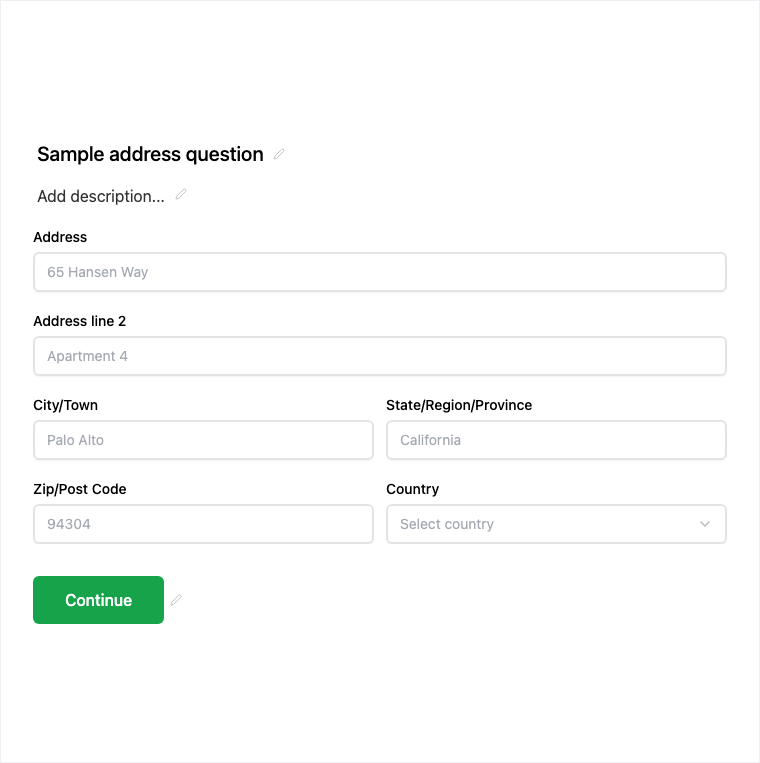
How it works
- 1Open Add Block and insert Address onto the canvas.
- 2Toggle street, city, region, postal, and country lines and set required toggles per line as needed.
- 3Preview the form to confirm the address layout for your audience.
- 4Publish so shipping or registration addresses are collected on the live form.
Benefits
- Structured address lines stay consistent in results and CSV export.
- Required toggles per line let you demand street and city without forcing country.
- Clear column display in results tables for ops and fulfillment teams.
Use cases
- Shipping or billing address capture on order and deposit forms.
- Event venue or mailing address for registration.
- Location-based applications that need a full postal address.
Tips and best practices
- Toggle country and region only when your audience needs them.
- Mark postal and street required for fulfillment flows; leave optional for soft interest forms.
- Pair with Contact Info when you need both identity and address in one intake.
Frequently asked questions
- What address lines does the block support?
- Typical lines include street, city, region, postal code, and country, with required toggles per line in the properties panel.
- Can I hide country or region?
- Yes. Toggle country and region fields in the builder so the live form only asks for the lines your audience needs.
- How do addresses appear in results?
- Address answers show clearly in results tables so teams can review and export structured location data.
Try it in FormitAI
Open the builder, configure this in a real form, publish a version, and share a link or embed. Start free - when a feature needs a paid plan, the builder tells you before you publish.
Open FormitAI