What is MCP integration?
Formit exposes a streamable HTTP MCP endpoint on the API origin. MCP clients (Cursor, Claude Desktop, and compatible tools) can list and edit forms, publish versions, and manage webhooks using your workspace permissions. Formit does not run hosted AI chat over MCP - the client model drives the session.
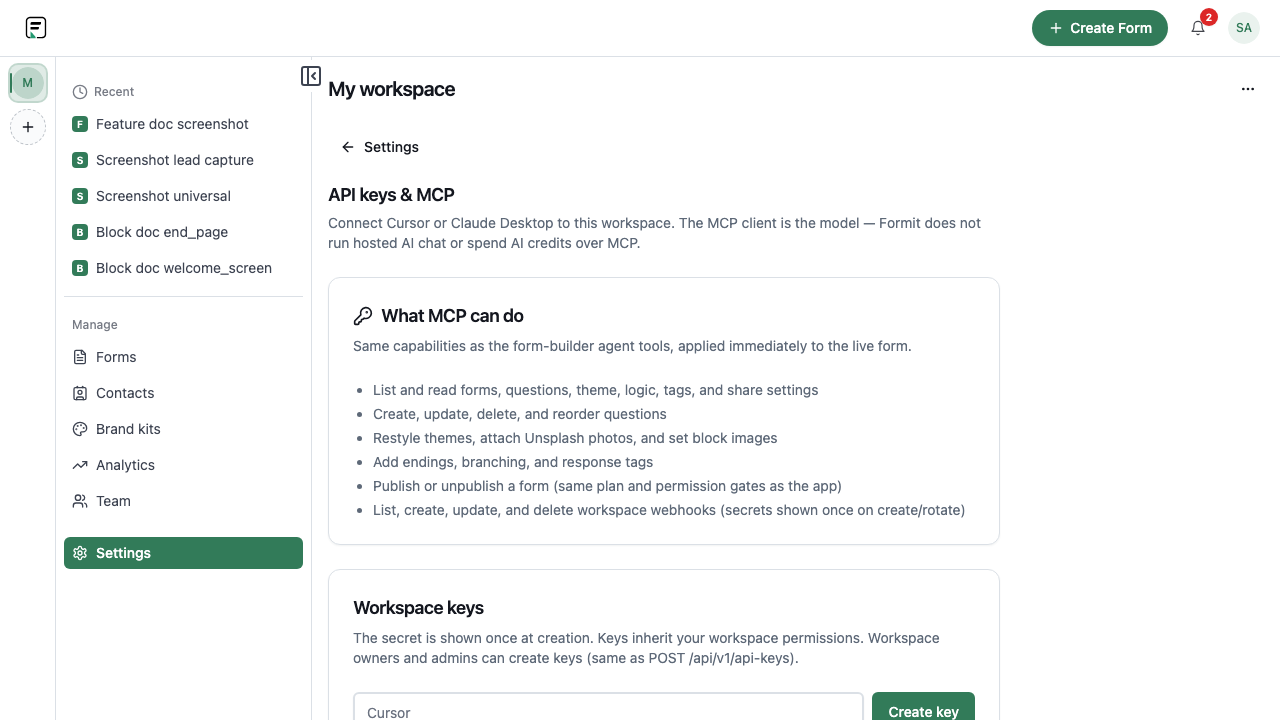
How it works
- 1Open Dashboard → Settings → API keys & MCP.
- 2Copy the MCP HTTP URL or OAuth mcp.json snippet for your client.
- 3Optional: create a workspace API key as a Bearer fallback when OAuth is unavailable.
- 4Connect the client and pick the workspace context when prompted.
- 5Use MCP tools to read or mutate forms with the same plan and permission checks as the web app.
Key capabilities
Form read/write tools
List forms, read questions, create/update/delete blocks, themes, logic, and tags.
Publish and unpublish
Publish or unpublish forms through MCP with the same paid-feature gates as the builder.
Webhook management
Create, update, delete, and rotate workspace webhooks (secrets shown once on create/rotate).
OAuth or API key auth
Clients can discover OAuth from 401 responses or send Authorization: Bearer with a workspace API key.
Limitations and plan notes
- MCP reflects workspace roles and plan gates - blocked actions fail the same way as in the web UI.
- Formit cannot detect whether an external MCP client is connected; verify in your client.
Try it in FormitAI
Open the builder, configure this in a real form, publish a version, and share a link or embed. Start free - when a feature needs a paid plan, the builder tells you before you publish.
Open FormitAI